Simple by design

Open Trana and choose one next step.

Trana is built for moments when everything feels too much. You can start with a check-in, a private message, a journal note, a calming tool, or go straight to safety resources. No setup quiz. No account required to begin.

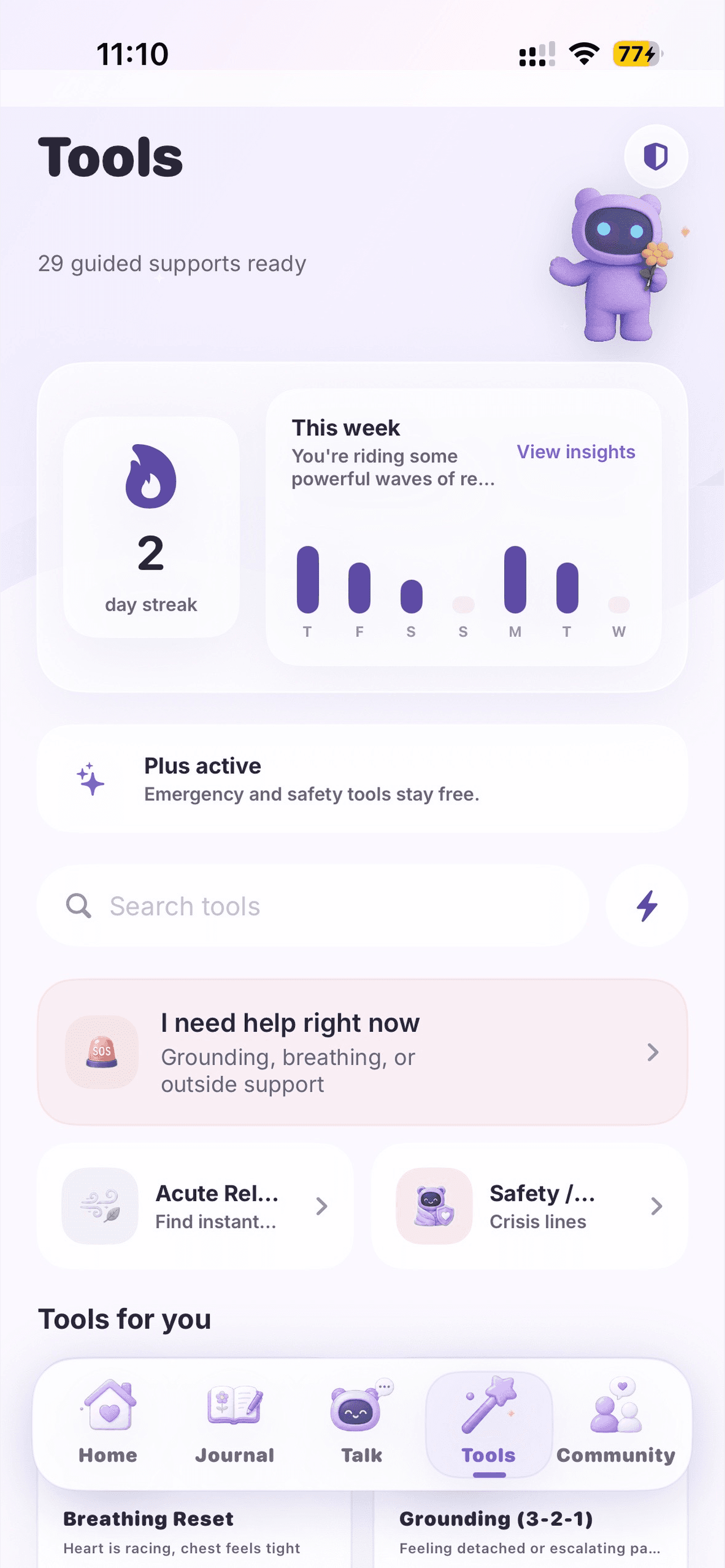
Trana tools screen

No blank start

Visible choices first. Conversation and tools when they're useful.

Four steps

A calmer path, without a long setup.

You don't need to solve everything before you begin. The app keeps the first action visible and the rest optional.

1

Check in

Open the app and name your mood and body stress in a few taps. Seven mood states. Three levels of body stress. An optional note only when useful. Takes less than a minute.

The check-in sets the context for the rest of your session — what support might help, what tools are most relevant — without making you answer a clinical questionnaire first.

2

Talk or choose a support

After checking in, you can talk privately with Trana's AI, or open a guided tool directly. You don't have to explain everything — you can also just pick the feeling closest to right now.

Trana's AI gives a brief, grounded response and suggests one next step. Or skip the conversation entirely and go straight to breathing, journaling, or whatever feels useful.

3

Take one small step

Open a guided tool and follow one short exercise. Most take 1–4 minutes. No long setup, no complicated instructions — just one clear thing to try.

The goal is not to fix everything. It's to lower the intensity enough to take the next step — whether that's continuing your day, reaching out, or just breathing a bit more steadily.

4

Notice what helps

Over time, your check-ins, tool use, conversations, and journal entries connect into a weekly summary. Written in plain language. No clinical scores. Just a quiet look at your week.

You might notice that Tuesday mornings are harder, that breathing tools help more than journaling, or that certain weeks have a pattern. That's enough to start making small changes.

Inside the app

Six areas, all clearly labelled.

Trana keeps the main actions visible so you can find what you need without searching. Each area has a clear purpose.

Home

Start here. Check in, see quick actions, open tools, or begin a conversation. Everything stays visible — nothing buried in menus.

Talk

Private AI conversation. Type what's happening or speak it. Get a brief reply and one suggested next step.

Guided Calm

29 guided calming exercises organized by feeling — panic, looping thoughts, low mood, sleep, focus, and safety.

Journal

Write freely or choose a prompt. Tag a mood. No pressure to write much — one sentence is enough.

Community

Optional. Anonymous support spaces — Calm Garden, Daily Prompts, and small circles — with full safety controls.

Profile

Weekly insights, your safety plan, privacy controls, data export, and account settings.

Common situations

What would you actually do in each moment?

Here's how Trana fits into real, specific situations — not a general list of features, but actual next steps for common heavy moments.

I woke up anxious and don't know why

Start with a check-in. Name the feeling closest to what you feel. Open the Breathing Reset tool — 4 seconds in, 6 out, nine cycles. Notice if the physical sensation eases.

My mind keeps looping on the same thought

Open Vent & Contain. Write everything out in 60 seconds — no editing. Then use the Control Circle to sort what's actually in your control. The loop often slows when the thought has somewhere to go.

I feel low and can't motivate myself

Open Tiny Step Activation. Rate your energy honestly — no judgment. Then pick the smallest possible action: something that takes two minutes and asks almost nothing. Energy follows movement.

I can't sleep and my thoughts are racing

Open the sleep support tools. Use a calm breathing pattern to settle your nervous system. Write the racing thought in the journal — getting it out of your head and onto a page often reduces its intensity.

I'm feeling panicky and need help now

Open Red Mode — always one tap away, always free. Use the Orienting exercise: name five things you can see, four you can feel, three you can hear. Ground yourself in the room you're actually in.

I want to write things down before speaking to anyone

Open the journal. No prompts needed. Just write. You can tag a mood if you want, but you don't have to. Your entries are private — visible only to you, never shared.

Start without an account.

Trana's guest mode lets you begin using the app without creating an account. No email, no password, no sign-in wall before you can breathe.

  • Access check-ins, tools, and AI conversation on the free plan
  • Safety tools and crisis resources always available
  • Guest data saved locally — create an account to sync and keep history
  • Upgrade to a full account anytime when you're ready

Your first session.

Here's what starting Trana for the first time looks like:

  1. 1Download Trana from the App Store — no account required to start
  2. 2Choose guest mode or create a free account
  3. 3Complete a short optional onboarding (your goals, what tends to help you)
  4. 4Open Home and complete your first check-in — mood + body stress + optional note
  5. 5Try one guided tool based on your check-in
  6. 6Come back the next day and do it again — patterns build over time

Designed for real life

Not for ideal conditions. For actual ones.

Trana is built for busy people, low-energy days, privacy-conscious users, and moments when the last thing you need is a complicated setup flow.

Busy or overwhelmed

Most tools take 1–3 minutes. You don't need a free hour to use Trana.

Low-energy days

Large buttons, clear choices, minimal text. Nothing that asks more than you can give right now.

Privacy concerns

Guest mode is available — start without creating an account. No social media login required.

Not sure what you need

Start with the check-in. Trana suggests what might help based on what you share.

Safety needs

Crisis resources, Red Mode, and trusted contacts are always visible — never buried.

Want to reflect privately

The journal is private. No one else sees it. No pressure to share with anyone.

Honest expectations

Designed for this. Not designed for that.

Trana is clear about its limits — because those limits matter.

Trana is not designed for:

  • Medical diagnosis, treatment, therapy, or clinical monitoring
  • Emergency response or acute crisis intervention
  • Children or teens under 18
  • Replacing a doctor, therapist, counsellor, psychiatrist, medication, or crisis service

If you are in immediate danger, please call your local emergency services. Trana provides resources, not emergency response.

Over time

Small check-ins build a bigger picture.

You don't have to use Trana every day for it to be useful. But when you do, the check-ins, tool sessions, conversations, and journal entries connect into weekly summaries that show you patterns you might not otherwise notice.

Check-ins → patterns → weekly insight → calmer decisions
Tool sessions → what helped → easier to find next time
Journal entries → themes → clearer understanding over time

Start gently

Download Trana and begin with one check-in.

Free to download. Designed for iPhone. Intended for adults 18+.

Download on the App Store